Guides
How to Use Notion for an Insurance Agency: Clients, Policies, and Renewals
Learn how to set up Notion for an insurance agency with clients, policy dates, renewal reminders, and commission tracking, plus PDF renewal letters and client summaries.
By Sanat Biswal · 2026-10-27 · 5 min read
{/ synced-from-notion — do not edit manually /}
In an insurance agency, the calendar is the business.
Every policy has a renewal date, and every renewal is a moment when a client either stays or leaves. Miss a date, and a client may find themselves uninsured, or may drift to a competitor who called first.
Most agencies know this. The trouble is that renewal dates tend to live in an insurer portal, a spreadsheet, and someone’s diary, and no single place shows what’s coming.
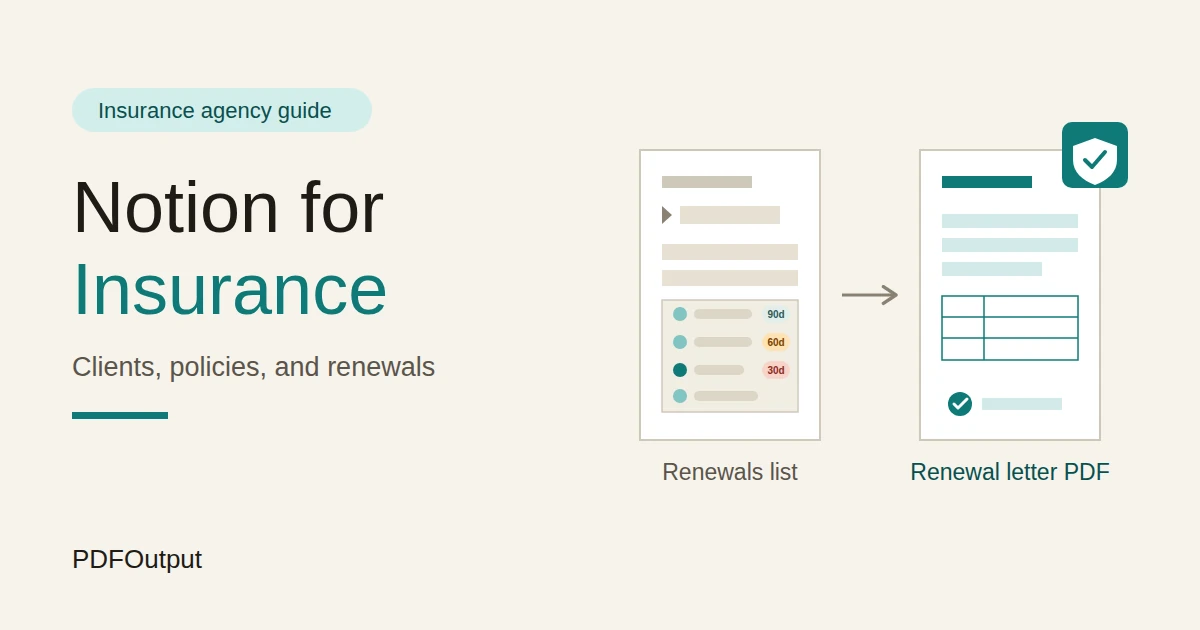
Notion can give you that single place. This guide is for small and mid-sized insurance agencies and brokers. It shows how to set up clients, policies, insurers, and a renewal pipeline, how to track commission, and how to turn records into PDFs such as renewal letters and client summaries.
It also explains what should stay out of Notion.
This is a general information about organizing an agency, not legal, regulatory, or financial advice, and insurance rules differ widely by country.
Short answer on how to use Notion for Insurance Agency:
To use Notion for an insurance agency, create linked databases for Clients, Policies, Insurers, Claims, a Contact Log, and Staff Licences.
Store reference numbers and key dates, and keep policy documents, identity documents, and sensitive details in the secure system your rules require.
Use formulas to flag renewals at 90, 60, and 30 days, calculate commission, and show when a client review is due.
When you need to give someone a document, such as a renewal letter or a client summary, create a PDF from the record.
Notion works well for an agency as a calendar and tracking layer. Each client, policy, insurer, and claim is a record, and the records are linked, so a client’s page shows every policy they hold, each policy’s renewal date, and the commission it earns.
Notion isn’t an agency management system, a quoting engine, or a connection to insurers. It doesn’t replace the official records, disclosures, and documents your regulator requires.
For documents that clients receive, you can export a page as a PDF or generate one from a template.
Table of Contents
What Notion Can and Can’t Do for an Insurance Agency
Notion is good for:
- Seeing every client, policy, and renewal date in one place.
- Flagging renewals well in advance.
- Tracking commission by policy, client, and insurer.
- Reminding you when a client review is due.
- Following the status of claims you’re supporting.
- Logging calls and decisions.
- Creating consistent renewal letters and client summaries.
- Quoting or comparing prices from insurers.
- Connecting to insurer systems or portals.
- Storing policy documents and identity documents securely.
- Taking premium payments.
- Replacing the official records your regulator requires.
- Clients stores who you look after. Add these properties: Client Name, Client Reference, Type (Individual or Business), Phone, Email, Preferred Contact, Contact Consent (checkbox), Last Review, Review Flag (a formula), Policy Count (a rollup), Total Premium (a rollup), and Notes.
- Policies is the main database. Add: Policy Reference, Client (relation), Insurer (relation), Type (Motor, Home, Business, Life, Travel, or Other), Start Date, Renewal Date, Premium, Commission Rate, Commission (a formula), Payment Frequency, Status (Active, Renewal In Progress, Renewed, Lapsed, or Cancelled), and Renewal Stage (Not Started, Contacted, Terms Received, Confirmed, or Declined).
- Insurers stores the companies you place business with. Add: Insurer, Contact, Phone, Portal Link, Agency Terms Notes, and Typical Commission.
- Claims stores claims you’re supporting. Add: Client (relation), Policy (relation), Claim Reference, Date Reported, Status (Reported, With Insurer, Awaiting Documents, Settled, or Declined), and Next Step. Keep details in the insurer’s system and your secure records.
- Contact Log stores conversations. Add: Client (relation), Date, Channel (Call, Email, Meeting, or Message), Summary, and Follow-up Date.
- Staff Licences stores dates that matter. Add: Person, Licence or Training, Date Obtained, Expiry Date, and Certificate Link.
- Renewals this month: active policies with a renewal date in the next 30 days, sorted by date.
- Renewal pipeline: a board of Policies grouped by Renewal Stage, so you can see what’s stuck.
- Overdue: policies with the Overdue flag, for urgent attention.
- By insurer: policies grouped by insurer, so you can batch the work.
- Renewal letters and summaries: the policy, the renewal date, the premium, and what the client needs to decide, in the form your rules require
- Client summaries: a one-page list of the policies a client holds, with insurers and renewal dates
- Review summaries: what was discussed, and what was agreed
- Onboarding checklists: what you need from a new client, with sensitive items collected securely
- Invoices and receipts for fees. Notion Receipt Template shows how to structure one.
- Commission summaries: for the owner or an accountant. How to Export a Notion Database to PDF helps with tables.
- Complaint acknowledgements and responses, with wording checked by someone qualified
- Staff licence and training registers: for audits and regulators
- Create your template with your agency’s name, logo, and layout.
- Add placeholders in double curly braces where the data should go, such as
{{Client_Name}}or{{Renewal_Date}}. - Make sure each placeholder matches the name of a Notion property.
- Start the document with a Notion database button or a status property.
- Ready to Generate creates a PDF from the database record.
- Generate Page converts the Notion page into a PDF.
- Generate PDF and Doc creates a PDF and a Google document.
- Preview creates a Google document so you can check it before making the final PDF.
- Generate E-Signed Doc creates an e-signed PDF in the database workflow.
- Give advisers access to their own clients and policies, not to commission or other advisers’ clients.
- Keep commission figures, complaints, and staff licence details in views that only the owner and compliance lead can open.
- Never give clients, insurers, or outside parties access to the workspace. Send finished PDFs.
- Don’t store identity documents, bank details, health details, or portal logins.
- Remove access on the day someone leaves, and think about who looks after their clients.
- Review who has access every few months.
- Write down your rules for what may and may not be stored in Notion, and make sure every new team member reads them.
- How to Use Notion for an Accounting Firm
- How to Use Notion for a Law Firm
- How to Use Notion for Property Management
- How to Export a Notion Database to PDF
Notion is not made for:
If you already use an agency management system or insurer portals, treat Notion as the planning layer beside them.
Link to the official record, and don’t try to copy it.
Rules, Records, and Client Data
Insurance is regulated almost everywhere, and the information involved is some of the most sensitive in any business. Before you build anything, think about 3 things.
The rules. Licensing, advice and suitability, disclosures, record keeping, complaints handling, and data protection all apply to agencies, and the details differ by country, region, and type of insurance.
Check what applies to you, ask your regulator or a compliance professional where you’re unsure, and keep the official records in the format required. A Notion record can be a working copy and a reminder, and it may not meet the rules by itself.
The data. Policies reveal addresses, vehicles, health, family, and finances. Decide what will never go into Notion:
| Usually reasonable to hold | Usually keep out, or only in a secure approved system |
|---|---|
| Client name and a client reference | Identity document numbers and scans |
| Policy reference, type, and insurer | Policy documents and schedules |
| Start and renewal dates | Health, medical, or claims details |
| Premium and commission figures | Bank and card details |
| Contact preferences and consent | Anything the client asked you to keep confidential |
| A short note of what was discussed | Passwords and portal logins |
Privacy rules differ by country, and many apply specifically to insurance and health information. If you can’t get a clear yes for a type of data, keep it out of Notion.
Note: While you are testing, use made-up clients.
Use these 6 Databases
Start with these 6 databases. You can add more later.
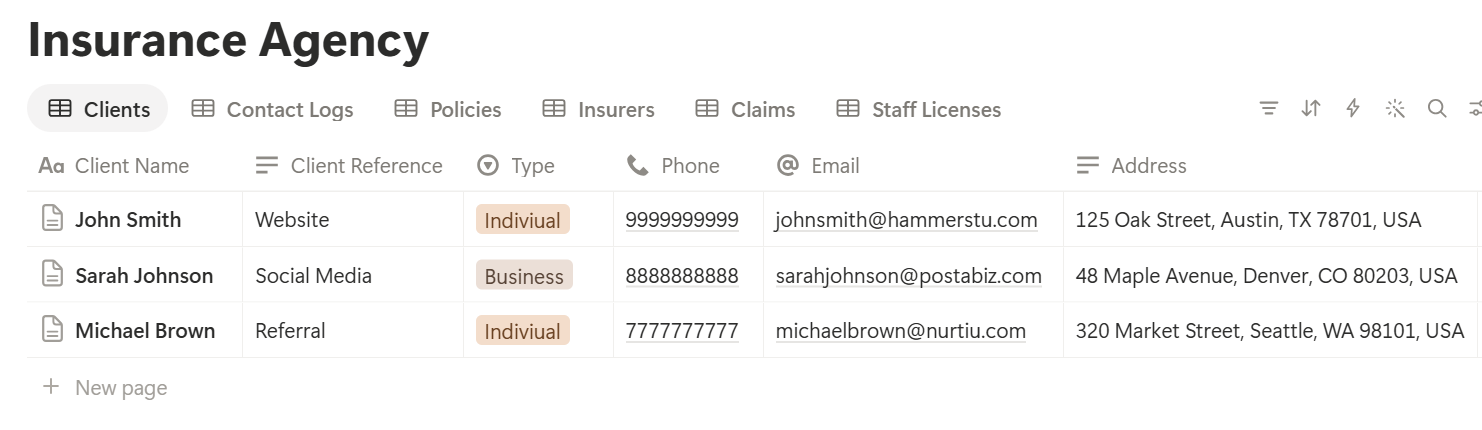
A relation connects a record in one database to a record in another. Link Policies to Clients and Insurers, Claims to Policies and Clients, and the Contact Log to Clients. Now a client’s page shows their policies, their renewal dates, their claims, and every conversation.
Renewals: The Heart of the Agency
A renewal is a decision point for the client and a deadline for you. A simple pipeline makes sure you’re early.
On Policies, add three formulas:
*Days to renewal: dateBetween(prop("Renewal Date"), now(), "days") Renewal flag: if(prop("Status") == "Active" or prop("Status") == "Renewal In Progress", if(prop("Days to renewal") < 0, "Overdue", if(prop("Days to renewal") <= 30, "30 days", if(prop("Days to renewal") <= 60, "60 days", if(prop("Days to renewal") <= 90, "90 days", "")))), "")*
The flag shows 90 days, 60 days, 30 days, or Overdue for active policies. Change the numbers to suit your insurers and your rules. Then make these views:
A Renewal Timeline
Here is a plan an agency might follow for one policy. The timings are examples, and your insurers and local rules may require something different, such as minimum notice before renewal.
| When | What to do |
|---|---|
| 90 days before | The flag appears. Check whether the client’s circumstances have changed |
| 60 days before | Request renewal terms from the insurer, and compare options where appropriate |
| 30 days before | Send the client a clear renewal summary, and ask for their decision |
| 14 days before | Chase if there’s no reply, and note each attempt |
| Renewal date | Confirm that cover is in force, and update the policy |
After renewal, update the Renewal Date to the new date, set the Status to Active, and reset the Renewal Stage. Test the formulas with made-up policies and check the dates against a calendar.
Pro Tip: Start the work at 90 days even when the insurer's terms arrive late. Clients with early, clear information stay far more often than clients who hear at the last minute.
Commission: Know What Each Policy Earns
Commission is how most agencies earn, and it’s easy to lose track of.
On Policies, add one formula:
Commission: prop("Premium") prop("Commission Rate")*
Format the rate as a percent and the commission as currency. Here is a made-up client with three policies. Amounts are in your own currency.
| Policy | Premium | Rate | Commission |
|---|---|---|---|
| Motor | 900 | 10% | 90 |
| Home | 600 | 12% | 72 |
| Travel | 150 | 15% | 22.50 |
| Total | 1,650 | 184.50 |
Commission rules vary, with different rates, clawbacks for cancelled policies, and different treatment of renewals. Record what your agreements say, and check the figures against your insurers’ statements. Notion helps you plan, and the insurer’s statement is the source of truth. Check how fees and commission must be disclosed to clients where you work. Test the formulas with made-up numbers and check them with a calculator.
Client Reviews and Cross-Selling
A client who only hears from you at renewal sees you as an administrator. A client who hears from you with something useful sees you as an adviser.
On Clients, add a review flag:
Review flag: if(dateBetween(now(), prop("Last Review"), "months") >= 12, "Review due", "")
The flag shows Review due for clients you haven’t reviewed in a year.
Make a view called Reviews due, sorted by last review date. A review is a short conversation: has anything changed, such as a new car, a house move, a business growing, or a new baby? Record the answers in the Contact Log, and update the client’s details.
Use a Client review template with these sections: what’s changed since last time, what the client is worried about, what’s covered now, and any actions. Recommendations about cover depend on your qualifications and the rules where you work, so follow your procedures for advice, and record what you discussed.
For simple opportunities, make a view of Clients with a Policy Count of one. A client with only one policy might benefit from a conversation about what else they need. Treat this as a prompt to talk, and never as a reason to push a product. Follow the rules about advice, suitability, and marketing where you work, and only contact people who agreed to hear from you.
Claims Support: Track Status, Not Details
When a client has a claim, they need two things: someone who answers, and someone who follows up. You may not handle the claim itself, because the insurer does, but you’re the person the client calls.
Keep a light Claims record for each claim you’re supporting, with the client, the policy, the insurer’s claim reference, the date reported, the status, and the next step. A view called Open claims, sorted by the date of the last update, shows which ones need a call.
Keep the details of the loss, the documents, and any medical or sensitive information in the insurer’s system and your secure records, and not in Notion. A line like “waiting for repair estimate from client” is enough.
Add a Claim follow-up reminder: if a claim hasn’t moved in ten working days, contact the insurer. Be kind and clear with the client, and don’t promise outcomes. Follow your regulator’s rules about handling and recording claims.
Contact Log: Never Lose a Conversation
A client says “I told you last month.” You can’t remember. The Contact Log answers that.
After each call or meeting, add a record with the client, the date, the channel, and a short summary. Add a follow-up date if one is promised, and a view of Follow-ups due shows what you owe people. Keep notes factual and professional, because a client or a regulator may one day read them.
A good note says what was discussed, what was decided, and what happens next. “Client asked about adding a second driver, I’ll send options by Friday” is useful. “Chat” is not.
Check how long you must keep records of client communications under your rules, and where they must be stored.
Complaints, Licences, and Training
Regulated businesses must show they handle problems properly and that their people are qualified.
Complaints. Create a Complaints database, restricted to managers, with the date, the client, what the complaint is about, who handles it, the response date, and the outcome. Your regulator probably sets deadlines for acknowledging and resolving complaints, so check them, and use a flag to remind you:
Complaint due: if(prop("Status") != "Closed" and dateBetween(prop("Response Due"), now(), "days") <= 3, "Due soon", "")
Licences and training. On Staff Licences, add:
*Days to expiry: dateBetween(prop("Expiry Date"), now(), "days") Licence flag: if(prop("Days to expiry") < 0, "Expired", if(prop("Days to expiry") <= 90, "Renew soon", ""))*
A view of licences with a flag, sorted by date, gives you one list to work through each month. Someone working without a valid licence can be a serious problem, so treat these dates carefully. Keep certificate files in a secure place and link to them. Required training and renewal rules differ by role and country, so check what applies to you.
A typical Wednesday at a Four-Person Agency
To see how the pieces fit, here is one made-up Wednesday.
8:30 am. The agency owner opens the home page. The Renewals this month view shows 14 policies. Three show the 30 days flag, and one shows Overdue.
8:45 am. She follows up the overdue one first. The client is travelling, so she emails, notes the attempt in the Contact Log, and checks that cover is still in force with the insurer.
10:00 am. An adviser opens the renewal pipeline board. Four policies are at Terms Received. He prepares a renewal summary for each client, and moves the policies to Contacted after sending.
11:30 am. A client calls about a car accident. The adviser creates a claim record with the insurer’s reference, writes a short note, and sets a follow-up for Friday. Details stay in the insurer’s system.
2:00 pm. The Reviews due view shows a client who hasn’t been reviewed in 14 months. The adviser books a call, and uses the client review template.
4:00 pm. The Staff Licences view shows one licence renewing in 60 days. The manager sets a reminder.
5:00 pm. The Follow-ups due view is empty. Nobody was left waiting.
Nothing depended on someone remembering.
The Documents That Leave Notion
Clients, insurers, and regulators don’t use your workspace, so some records need to become files:
Any document that goes to a client about their cover has to be accurate and follow your regulator’s rules about advice and disclosures, so have the wording checked by someone qualified, and never let a template say more than your records support.
For a single page, you can use Notion’s export option.
How to Export Notion to PDF shows the settings. Clients notice how clear and professional your letters look, and Notion’s own export gives you limited control over layout. How to Add Your Logo and Brand Colors to Notion PDFs explains how a template solves that.
Generating PDFs with PDFOutput
PDFOutput creates documents from your Notion data using a template. A template can be a Google document, a Word file, a PDF file, or a Notion page. If you already have a renewal letter layout in Word or Google Docs, you can reuse it.
Here is how it works:
These are some of the status options:
The e-signed option may help with internal acknowledgements and some client forms. Whether an electronic signature is valid for a given document depends on your location, the type of document, and your regulator’s rules, so check before you rely on it. You can save the finished file to a property in your database, so a renewal letter stays on its policy record. You can also save it to a Google Drive folder and store the link in a property.
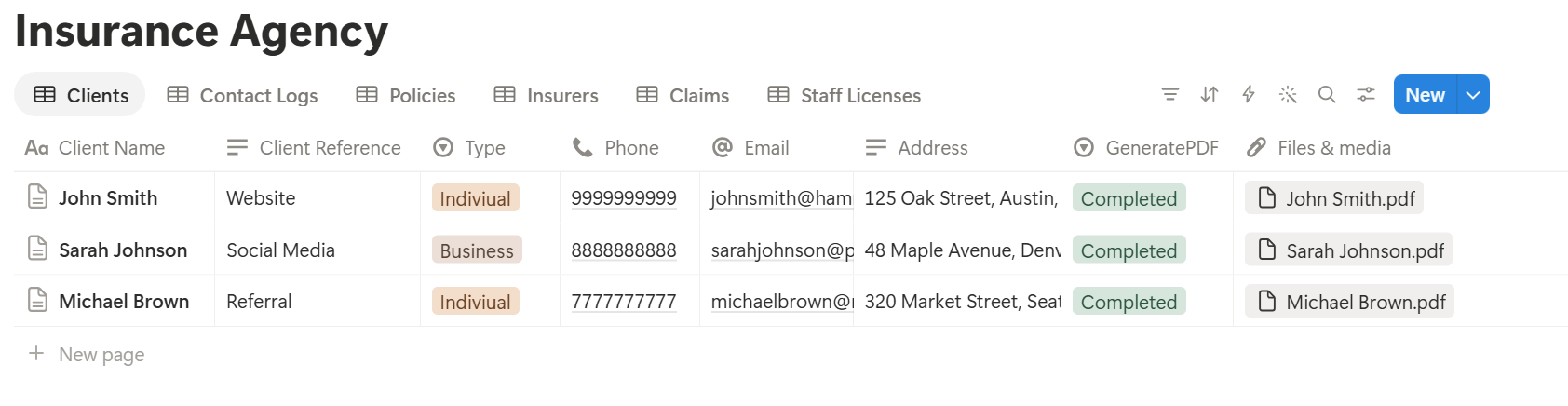
A renewal letter for one policy uses properties from a single record, which is straightforward. A client summary that lists several policies depends on linked records, and I don’t know whether a template can list several of them. Test it with a sample client who has several policies, and check that each appears the way you want. If it doesn’t, a simple fallback is to keep a short “Policy Summary” text property on the client, which you update before each summary, and use that in the template.
Before using any document tool with information about insurance clients, ask the provider how data is handled, where it’s stored, and what agreements are available, and keep the answers with your compliance records. The safest approach is to generate documents from records that hold only references, dates, and figures, as in this guide. Check the client’s name and the policy on every letter before you send it.
Start with the renewal letter, since you’ll send dozens. Use Preview first and check for empty fields, the right client and policy, correct dates, and premium figures that match the insurer’s terms.
Key Takeaway: Start the renewal calendar at 90 days, log every contact, and keep sensitive documents in the secure system. If the dates and conversations are recorded, renewal letters, summaries, and reports come from data you already have.
Who Can See What
Your workspace will hold client details, premiums, and commission, so control access from the start.
Common Mistakes
Treating Notion as the official record. If your regulator requires a set format, keep that record, and use Notion as the reminder and the working copy.
Assuming silence means yes. A client who doesn’t reply to a renewal needs a documented follow-up, and not an assumption.
Storing sensitive documents. Policy documents, ID scans, and health details belong in a secure system. Link to them.
Flags without action. A 30-day flag helps only if someone owns the next step. Give each renewal an owner.
Copying commission from memory. Check figures against the insurer’s statements.
Pushing products. A cross-sell view is a prompt to talk, and advice must follow your rules.
Too many properties. If a policy takes five minutes to log, the data will go stale. Keep it short.
No owner for the structure. Pick one person responsible for the setup. Properties get renamed and formulas break, so tell that person not to rename properties used in PDF templates, because the placeholders must match exactly.
Skipping a test. Run a month with made-up clients and policies first, and fix what annoys the team before you use real records.
Frequently Asked Questions
Can Notion be used for an insurance agency?
Yes, as a calendar and tracking layer for clients, policies, renewals, commission, and contact notes. It isn’t an agency management system, a quoting tool, or a connection to insurers, and it doesn’t replace the official records your regulator requires.
How do I track insurance renewals in Notion?
Create a Policies database linked to clients, with a renewal date and a status. Add a formula that counts the days to renewal and shows a flag at 90, 60, and 30 days, and make a view of policies renewing this month.
How do I track commission in Notion?
Add a premium and a commission rate to each policy, and use a formula that multiplies them. Roll up the totals on each client, and check the figures against the insurer’s statements.
Is it safe to store client information in Notion?
That depends on the laws and rules where you work. Collect only what you need, keep identity documents, policy documents, health details, and bank details in a secure approved system, and limit who can see records. Check with a compliance professional if you’re unsure.
Can I create renewal letters from Notion?
You can export a page as a PDF, or use a template-based tool such as PDFOutput to fill a letter template with data from each policy record. The wording must follow your regulator’s rules, so have it checked by someone qualified, and test the layout on a few sample records first.
Should clients have access to my Notion workspace?
No. Your workspace holds other clients and commission information. Send each client only their own PDF.
How long should I keep client records?
Retention periods depend on your regulator and the type of insurance. Check what applies to you, and keep official records in the format and place required.
Related Reading
Conclusion
A good insurance agency setup in Notion puts the calendar first: every policy with a renewal date, a flag that appears at 90, 60, and 30 days, a contact log that records every conversation, and a commission figure for every policy. Settle the question of client data first, keep sensitive documents in the secure system, and run a month with made-up clients before you use real records. When your renewal letters, client summaries, and reports need to leave Notion, PDFOutput can fill your template from each record and save the PDF to your chosen storage.
Want renewal letters and client summaries as clean PDFs? Try PDFOutput.